Best Tools for Getting System Information on Modern and Legacy Windows PCs
April 27, 2025· Jorge Iglesias· Computers
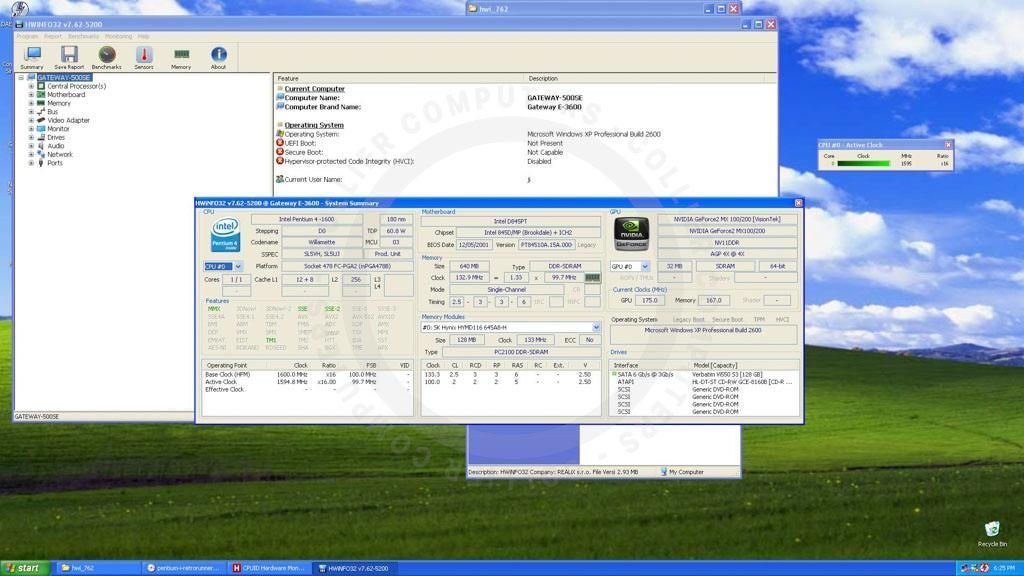
<p>When working with computers, understanding your system’s specifications is vital—whether you’re troubleshooting, upgrading, or restoring a legacy machine. From the newest Windows 11 PCs to classic systems like Windows 95, having the right tools can make all the difference. For enthusiasts and professionals like me, tracking builds and cataloging their components is not just a matter of convenience—it’s an essential step in managing, upgrading, and even benchmarking performance.</p>
<p>In this guide, we’ll explore the best system information tools for Windows, discuss their compatibility across various operating systems, and examine how this data is critical for tasks like benchmarking, which can provide valuable insights into your system's capabilities and limitations.</p>
<hr class="wp-block-separator has-alpha-channel-opacity"/>
<h3 class="wp-block-heading"><strong>Modern Tools for System Information</strong></h3>
<div class="wp-block-group alignfull" style="margin-top:0;margin-bottom:0;padding-top:calc( 0.5 * var(--wp--style--root--padding-right, var(--wp--custom--gap--horizontal)));padding-right:var(--wp--style--root--padding-right, var(--wp--custom--gap--horizontal));padding-bottom:calc( 0.5 * var(--wp--style--root--padding-right, var(--wp--custom--gap--horizontal)));padding-left:var(--wp--style--root--padding-left, var(--wp--custom--gap--horizontal))"><div style="height:calc( 0.25 * var(--wp--style--root--padding-right, var(--wp--custom--gap--horizontal)))" aria-hidden="true" class="wp-block-spacer"></div>
<div class="wp-block-columns alignfull" style="padding-top:0;padding-right:0;padding-bottom:0;padding-left:0"><div class="wp-block-column"><figure class="wp-block-image alignright size-medium"><a href="https://www.hwinfo.com/"><img src="https://colliercomputers.com/wp-content/uploads/2024/12/hwinfo-large-300x300.png" alt="" class="wp-image-813" style="aspect-ratio:2/3;object-fit:contain"/></a></figure>
</div>
<div class="wp-block-column is-vertically-aligned-center" style="padding-top:0;padding-right:0;padding-bottom:0;padding-left:0"><div class="wp-block-group" style="padding-top:50px;padding-right:50px;padding-bottom:50px;padding-left:50px"><div class="wp-block-group alignfull" style="margin-top:var(--wp--preset--spacing--40);margin-bottom:var(--wp--preset--spacing--40);padding-top:0px;padding-right:60px;padding-bottom:0px;padding-left:60px"><h2 class="wp-block-heading has-text-align-left has-large-font-size"><strong>HWiNFO</strong></h2>
<p style="margin-bottom:var(--wp--preset--spacing--40)"><a href="https://www.hwinfo.com/">HWiNFO </a>is one of the most comprehensive tools available. It offers in-depth diagnostics and real-time monitoring for modern systems. If you’re running Windows XP, 7, 8, 10 or 11, this tool is perfect for getting insights into your CPU, GPU, memory, and more.</p>
</div>
<div class="wp-block-group"><h5 class="wp-block-heading" style="text-transform:capitalize"><strong>Strengths</strong></h5>
<p style="margin-top:25px;margin-right:0;margin-bottom:0;margin-left:0;padding-top:0;padding-right:0;padding-bottom:0;padding-left:0">Real-time monitoring, detailed hardware data.</p>
</div>
<div class="wp-block-group"><h5 class="wp-block-heading" style="text-transform:capitalize"><strong>Compatibility</strong></h5>
<p style="margin-top:25px">Windows XP and newer.</p>
</div>
</div>
</div>
</div>
<div class="wp-block-columns alignfull" style="padding-top:0;padding-right:0;padding-bottom:0;padding-left:0"><div class="wp-block-column is-vertically-aligned-center" style="padding-top:0;padding-right:0;padding-bottom:0;padding-left:0"><div class="wp-block-group" style="padding-top:50px;padding-right:50px;padding-bottom:50px;padding-left:50px"><div class="wp-block-group alignfull" style="margin-top:var(--wp--preset--spacing--40);margin-bottom:var(--wp--preset--spacing--40);padding-top:0px;padding-right:60px;padding-bottom:0px;padding-left:60px"><h2 class="wp-block-heading has-text-align-right has-large-font-size"><strong>Speccy</strong></h2>
<p class="has-text-align-right" style="margin-bottom:var(--wp--preset--spacing--40)">If you prefer a simple, clean interface, <a href="https://www.ccleaner.com/speccy">Speccy</a> is your go-to option. It provides an overview of your system, including CPU, RAM, storage, and temperatures. It’s ideal for quick system checks.</p>
</div>
<div class="wp-block-group"><h5 class="wp-block-heading has-text-align-right" style="text-transform:capitalize"><strong>Strengths</strong></h5>
<p class="has-text-align-right" style="margin-top:25px;margin-right:0;margin-bottom:0;margin-left:0;padding-top:0;padding-right:0;padding-bottom:0;padding-left:0">User-friendly, lightweight.</p>
</div>
<div class="wp-block-group"><h5 class="wp-block-heading has-text-align-right" style="text-transform:capitalize"><strong>Compatibility</strong></h5>
<p class="has-text-align-right" style="margin-top:25px">Windows XP and newer.</p>
</div>
</div>
</div>
<div class="wp-block-column is-vertically-aligned-center"><figure class="wp-block-image size-medium"><a href="https://www.ccleaner.com/speccy"><img src="https://colliercomputers.com/wp-content/uploads/2024/12/speccy-logo-1-300x300.png" alt="" class="wp-image-815"/></a></figure>
</div>
</div>
</div>
<div class="wp-block-group alignfull" style="margin-top:0;margin-bottom:0;padding-top:calc( 0.5 * var(--wp--style--root--padding-right, var(--wp--custom--gap--horizontal)));padding-right:var(--wp--style--root--padding-right, var(--wp--custom--gap--horizontal));padding-bottom:calc( 0.5 * var(--wp--style--root--padding-right, var(--wp--custom--gap--horizontal)));padding-left:var(--wp--style--root--padding-left, var(--wp--custom--gap--horizontal))"><div class="wp-block-columns alignfull" style="padding-top:0;padding-right:0;padding-bottom:0;padding-left:0"><div class="wp-block-column"><figure class="wp-block-image alignright size-medium"><a href="https://www.belarc.com/products/belarc-advisor"><img src="https://colliercomputers.com/wp-content/uploads/2024/12/belarc-advisor-logo-300x254.png" alt="" class="wp-image-816" style="aspect-ratio:2/3;object-fit:contain"/></a></figure>
</div>
<div class="wp-block-column is-vertically-aligned-center" style="padding-top:0;padding-right:0;padding-bottom:0;padding-left:0"><div class="wp-block-group" style="padding-top:50px;padding-right:50px;padding-bottom:50px;padding-left:50px"><div class="wp-block-group alignfull" style="margin-top:var(--wp--preset--spacing--40);margin-bottom:var(--wp--preset--spacing--40);padding-top:0px;padding-right:60px;padding-bottom:0px;padding-left:60px"><h2 class="wp-block-heading has-text-align-left has-large-font-size"><strong>Belarc Advisor</strong></h2>
<p style="margin-bottom:var(--wp--preset--spacing--40)">For those who need both hardware details and software insights, including security updates and license tracking, <a href="https://www.belarc.com/products/belarc-advisor">Belarc Advisor</a> offers a unique blend of features.</p>
</div>
<div class="wp-block-group"><h5 class="wp-block-heading" style="text-transform:capitalize"><strong>Strengths</strong></h5>
<p style="margin-top:25px;margin-right:0;margin-bottom:0;margin-left:0;padding-top:0;padding-right:0;padding-bottom:0;padding-left:0">Security-focused, detailed license reports.</p>
</div>
<div class="wp-block-group"><h5 class="wp-block-heading" style="text-transform:capitalize"><strong>Compatibility</strong></h5>
<p style="margin-top:25px">Windows Vista and newer.</p>
</div>
</div>
</div>
</div>
<div class="wp-block-columns alignfull" style="padding-top:0;padding-right:0;padding-bottom:0;padding-left:0"><div class="wp-block-column is-vertically-aligned-center" style="padding-top:0;padding-right:0;padding-bottom:0;padding-left:0"><div class="wp-block-group" style="padding-top:50px;padding-right:50px;padding-bottom:50px;padding-left:50px"><div class="wp-block-group alignfull" style="margin-top:var(--wp--preset--spacing--40);margin-bottom:var(--wp--preset--spacing--40);padding-top:0px;padding-right:60px;padding-bottom:0px;padding-left:60px"><h2 class="wp-block-heading has-text-align-right has-large-font-size"><strong><strong>CPU-Z</strong></strong></h2>
<p class="has-text-align-right" style="margin-bottom:var(--wp--preset--spacing--40)">Designed for CPU enthusiasts, CPU-Z offers detailed information about your processor, RAM, and motherboard. It’s particularly useful for overclockers and system builders.</p>
</div>
<div class="wp-block-group"><h5 class="wp-block-heading has-text-align-right" style="text-transform:capitalize"><strong>Strengths</strong></h5>
<p class="has-text-align-right" style="margin-top:25px;margin-right:0;margin-bottom:0;margin-left:0;padding-top:0;padding-right:0;padding-bottom:0;padding-left:0">In-depth CPU data.</p>
</div>
<div class="wp-block-group"><h5 class="wp-block-heading has-text-align-right" style="text-transform:capitalize"><strong>Compatibility</strong></h5>
<p class="has-text-align-right" style="margin-top:25px">Windows XP and newer.</p>
</div>
</div>
</div>
<div class="wp-block-column is-vertically-aligned-center"><figure class="wp-block-image size-medium"><a href="https://www.cpuid.com/softwares/cpu-z.html"><img src="https://colliercomputers.com/wp-content/uploads/2024/12/cpu-z-logo-200x300.png" alt="" class="wp-image-817"/></a></figure>
</div>
</div>
<div class="wp-block-columns alignfull" style="padding-top:0;padding-right:0;padding-bottom:0;padding-left:0"><div class="wp-block-column"><figure class="wp-block-image alignright size-medium"><img src="https://colliercomputers.com/wp-content/uploads/2024/12/hwmonitor-logo-300x300.png" alt="" class="wp-image-818" style="aspect-ratio:2/3;object-fit:contain"/></figure>
</div>
<div class="wp-block-column is-vertically-aligned-center" style="padding-top:0;padding-right:0;padding-bottom:0;padding-left:0"><div class="wp-block-group" style="padding-top:50px;padding-right:50px;padding-bottom:50px;padding-left:50px"><div class="wp-block-group alignfull" style="margin-top:var(--wp--preset--spacing--40);margin-bottom:var(--wp--preset--spacing--40);padding-top:0px;padding-right:60px;padding-bottom:0px;padding-left:60px"><h2 class="wp-block-heading has-text-align-left has-large-font-size"><strong><strong>HWMonitor</strong></strong></h2>
<p style="margin-bottom:var(--wp--preset--spacing--40)"><a href="https://www.cpuid.com/softwares/hwmonitor.html">HWMonitor</a> specializes in real-time monitoring of voltages, temperatures, and fan speeds. If you’re concerned about system health, this tool is a great choice.</p>
</div>
<div class="wp-block-group"><h5 class="wp-block-heading" style="text-transform:capitalize"><strong>Strengths</strong></h5>
<p style="margin-top:25px;margin-right:0;margin-bottom:0;margin-left:0;padding-top:0;padding-right:0;padding-bottom:0;padding-left:0">Hardware monitoring.</p>
</div>
<div class="wp-block-group"><h5 class="wp-block-heading" style="text-transform:capitalize"><strong>Compatibility</strong></h5>
<p style="margin-top:25px">Windows XP and newer.</p>
</div>
</div>
</div>
</div>
</div>
<hr class="wp-block-separator has-alpha-channel-opacity"/>
<h3 class="wp-block-heading"><strong>My Experience with System Information Tools</strong></h3>
<p>Over the years, I’ve used several tools to gather system information, and two that stand out are <strong>HWiNFO32</strong> and <strong>CPU-Z</strong>. Both are excellent in their own ways, but I’ve found that <strong>HWiNFO32</strong> provides a much more detailed breakdown of hardware components and real-time performance metrics. It goes beyond the basics, offering in-depth insights into the CPU, GPU, motherboard, and even sensors, making it invaluable for troubleshooting and understanding system behavior.</p>
<p>On the other hand, <strong>CPU-Z</strong> is a simpler tool, focused primarily on detailed CPU specifications and memory data. While it’s great for quick checks, it doesn’t match the depth of HWiNFO32 for overall system diagnostics.</p>
<p>I’ve also tried <strong>CPUID Hardware Monitor</strong>, but it didn’t quite meet my needs. While it displayed some temperature readings—like the SSD temps—it felt too limited compared to the comprehensive data provided by the other tools. For anyone needing more than just basic thermal monitoring, I’d recommend exploring options like HWiNFO32 instead.</p>
<hr class="wp-block-separator has-alpha-channel-opacity" style="margin-top:var(--wp--preset--spacing--20);margin-bottom:var(--wp--preset--spacing--20)"/>
<h3 class="wp-block-heading"><strong>Legacy Tools for Older Systems</strong></h3>
<p>If you’re working with vintage systems like Windows 95, 98, ME, or 2000, most modern tools won’t work. Instead, try these alternatives:</p>
<h4 class="wp-block-heading"><strong>Everest Home Edition</strong></h4>
<p>An excellent tool for legacy PCs, <a href="https://everest-home-edition.en.softonic.com/">Everest Home Edition</a> provides detailed system diagnostics and runs on older Windows versions.</p>
<ul class="wp-block-list has-work-sans-font-family"><li><strong>Compatibility:</strong> Windows 95, 98, ME, and 2000.</li>
</ul>
<h4 class="wp-block-heading"><strong>Sandra Lite (Legacy Versions)</strong></h4>
<p>Older versions of <a href="https://sisoft-sandra-lite.en.uptodown.com/windows/versions">SiSoftware Sandra</a> support legacy operating systems and offer detailed hardware and software analysis.</p>
<ul class="wp-block-list has-work-sans-font-family"><li><strong>Compatibility:</strong> Windows 95, 98, ME, and 2000.</li>
</ul>
<h4 class="wp-block-heading"><strong>Built-in System Utilities</strong></h4>
<ul class="wp-block-list has-work-sans-font-family"><li style="padding-top:var(--wp--preset--spacing--10);padding-bottom:var(--wp--preset--spacing--10)">Use <code><a href="https://learn.microsoft.com/en-us/windows-server/administration/windows-commands/msinfo32">msinfo32</a></code> for general system information.</li>
<li>Use <code><a href="https://www.google.com/url?sa=t&source=web&rct=j&opi=89978449&url=https://www.intel.com/content/www/us/en/support/articles/000022556/graphics.html&ved=2ahUKEwjh1aWW45aKAxVPRzABHZ1OPSYQFnoECC8QAQ&usg=AOvVaw1nMT_JUspwq_5iK2x0Bnyz">dxdiag</a></code> for graphics and sound details.</li>
</ul>
<hr class="wp-block-separator has-alpha-channel-opacity" style="margin-top:var(--wp--preset--spacing--20);margin-bottom:var(--wp--preset--spacing--20)"/>
<h3 class="wp-block-heading"><strong>Using System Information for Benchmarking</strong></h3>
<p>Benchmarking your system is the next logical step after gathering detailed hardware and software data. Benchmarking allows you to evaluate your system's performance, identify bottlenecks, and optimize hardware configurations for better efficiency.</p>
<p>Here’s how system information tools contribute to effective benchmarking:</p>
<ol style="padding-top:0;padding-bottom:0" class="wp-block-list has-work-sans-font-family"><li style="border-style:none;border-width:0px;padding-top:var(--wp--preset--spacing--10);padding-right:0;padding-bottom:var(--wp--preset--spacing--10);padding-left:0"><strong>Baseline Hardware Analysis:</strong><br>Tools like HWiNFO and CPU-Z provide detailed specifications for your CPU, GPU, memory, and storage. These serve as the foundation for benchmarking, ensuring you're testing the actual hardware without assumptions.</li>
<li style="padding-top:var(--wp--preset--spacing--10);padding-bottom:var(--wp--preset--spacing--10)"><strong>Real-Time Monitoring:</strong><br>Benchmarking often pushes your hardware to its limits. Monitoring tools like HWMonitor and HWiNFO track metrics such as temperatures, voltages, and clock speeds during stress tests, helping you understand how your system handles high workloads.</li>
<li style="padding-top:var(--wp--preset--spacing--10);padding-bottom:var(--wp--preset--spacing--10)"><strong>Performance Comparisons:</strong><br>Many benchmarking tools, such as Cinebench and 3DMark, integrate seamlessly with system information data to contextualize results. For instance, CPU-Z’s benchmarking feature lets you compare your CPU’s performance to similar models.</li>
<li><strong>Tracking Upgrades Over Time:</strong><br>Benchmarking combined with detailed system information creates a performance history for your builds. Whether you're overclocking or upgrading components, you can measure the impact of changes and ensure optimal performance.</li>
</ol>
<hr class="wp-block-separator has-alpha-channel-opacity"/>
<h3 class="wp-block-heading"><strong>Which Tools Should You Use?</strong></h3>
<p>The right tool depends on your operating system and your needs:</p>
<ul class="wp-block-list has-work-sans-font-family"><li>For <strong>modern systems</strong>: HWiNFO, Speccy, CPU-Z, or HWMonitor.</li>
<li>For <strong>legacy systems</strong>: Everest Home Edition or built-in utilities.</li>
</ul>
<p>By combining tools, you can gain a complete understanding of your system’s capabilities, whether you’re working on a vintage machine or the latest hardware.</p>
<hr class="wp-block-separator has-alpha-channel-opacity"/>
<h3 class="wp-block-heading"><strong>Conclusion</strong></h3>
<p>Understanding your system’s hardware and software details is essential for any tech enthusiast or professional. Whether you’re diagnosing a Windows XP PC or restoring a classic Windows 98 setup, these system information tools will provide you with the insights you need to manage and optimize your hardware.</p>
<p>For those looking to take things a step further, these tools also play a crucial role in benchmarking—evaluating system performance, identifying bottlenecks, and tracking upgrades over time. Stay tuned for our upcoming guide on how to use system information tools for benchmarking and which benchmarking tools are best for your needs.</p>